


Addressable RGB IP65 Waterproof LED Strip Light — 12V, 3W/ft


More images


- Pixel-Level Color Control
- Chasing, Gradient & Animated Effects
- Music-Reactive
- App + remote control
 CONFIGURE & BUY
Purchase
Ordering for a larger project?
Ask about volume pricing
| VOLUME DISCOUNTS | ||||
| QTY | 10 - 49 | 50 - 99 | 100 - 249 | 250 - 499 |
| % OFF | 2.5% | 5% | 7.5% | 10% |

Complete Your Setup
Compatible accessories for your product. Each item appears separately in your cart.


Product Details
| Series: Specialty / Addressable | Light Type / Color: Addressable RGB Color-Changing |
| LED Density: 30 LEDs/m | Pixel Density: 10 pixels/m (3 LEDs per pixel) |
| Input Voltage: 12V DC | Power: 3W/ft nominal |
| IP Rating: IP65 — Waterproof / Outdoor | Control: IC pixel controller required |
| PCB Width: 10mm | Cut Length: Every 3 LEDs / approx. 3.94 in. |
| Reel Length: 16.4 ft (5m) | Mounting: 3M VHB adhesive backing |
| LED Type: 5050 SMD RGB, IC-addressable | Beam Angle: 120° |
| Operating Temperature: -20°C to +45°C | Lifespan: L80 > 50,000 hours |
Description
 This 12V addressable RGB LED strip adds individually controlled pixel groups for animated color effects that are not possible with a standard RGB strip. Create chasing patterns, flowing gradients, music-reactive effects, and custom scenes while the IP65 silicone coating provides added protection for indoor or outdoor installations.
Pixel-Level Color Control
Built-in IC chips divide the strip into individually controllable pixel groups, with 3 LEDs per pixel. Unlike a standard RGB strip where the entire run displays the same color at once, different pixels can display different colors simultaneously for gradients, chasing effects, animations, and custom patterns.
App & Remote Control
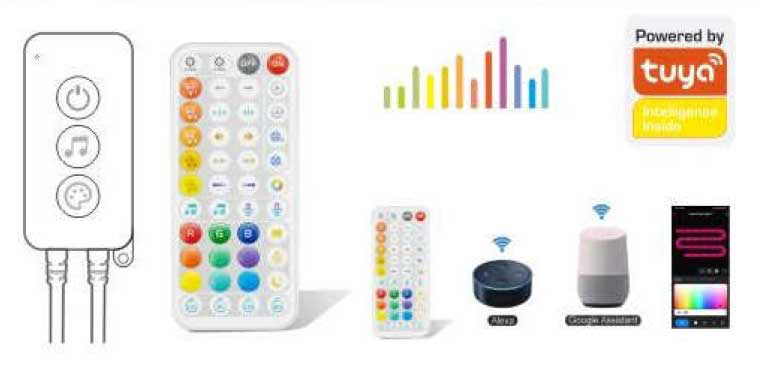
A compatible addressable RGB controller is required and sold separately. The controller provides app and remote access to color selection, brightness, animated scenes, music-reactive effects, and custom pixel patterns.
- Control individual pixel groups
- Create gradients and chasing effects
- Adjust color and brightness
- Choose built-in animated scenes
- Sync effects to music
- Create and save custom effects
Addressable RGB Configuration
| Part Number | Color | LED Density | Pixel Density | Reel Length |
|---|---|---|---|---|
| PIX30-IP6512V10M-RGB-5M | Addressable RGB | 30 LEDs/m | 10 pixels/m | 16.4 ft (5m) |
Waterproof Protection
A protective silicone coating gives the strip its IP65 rating, making it a good choice for indoor, outdoor, damp, and exposed accent-lighting applications.
Length & Cutting
The strip is supplied as a full 16.4 ft (5m) roll and can be cut every 3 LEDs, or approximately every 3.94 inches. Each cut section represents one independently controlled pixel group.
Scenes & Effects
 Choose from built-in chasing, colorful, flashing, music, and DIY modes or create your own effects through the app. Addressable control makes the strip especially useful for gaming spaces, patios, bars, displays, signage, events, entertainment lighting, and architectural accents.
Power & Control
A 12V DC power supply and compatible addressable RGB controller are required. The published strip power is 7.2W/m, or approximately 36W for a full 5m roll. Use the full-roll wattage when sizing the power supply and allow appropriate additional capacity.
Controller Setup
For Wi-Fi control, power the controller with a 12V DC supply, add the lighting device through the compatible app, place the controller in pairing mode, and connect it to a 2.4GHz Wi-Fi network. Once connected, the app provides access to Color, Scene, Music, and DIY modes.
Need Help with LED Strips?
Full Documentation
 Documentation
 Accessories
Addressable Strip Controller
Controller: Addressable (IC) RGB Strips - Tuya WiFi + RF Remote
Addressable (ICRGB) Strip Connectors
EZClick™ 3-Pin (ICRGB) 10mm IP65 LED Strip Connectors
Shipping
LEDSupply does NOT profit from the shipping or handling of your order!
Orders received before 3PM EST will be safely packaged and quickly shipped the same business day. If your order is NOT shipped the same business day, LEDSupply will offer a 5% discount off your next order.
All orders SHIP FROM:
296 Beanville Road
Randolph, Vermont 05060
See respective ZONE maps below for SPECIFIC delivery time to your location:
Any order that does not qualify for free shipping, will by default include a discount of equal value to the free shipping offer.
The shipping offered is meant to provide the widest variety of shipping options at the lowest price:
USPS Priority Delivery Zone Map:

FedEX Ground Delivery Zone Map:

UPS Ground Delivery Zone Map:


- Low Prices
- Knowledgeable Support
- 100K+ Orders Shipped
- Free Shipping
- Bulk Discounts
- 2,000+ 5-Star Reviews

LEDSupply is a trusted provider of engineered LED lighting solutions, serving OEMs, integrators, contractors, and lighting professionals with technical expertise, application support, and carefully curated high-performance products. Backed by decades of industry experience, our team helps customers move from components to complete lighting solutions with confidence. Learn More


Shipping
LEDSupply does NOT profit from the shipping or handling of your order!
Orders received before 3PM EST will be safely packaged and quickly shipped the same business day. If your order is NOT shipped the same business day, LEDSupply will offer a 5% discount off your next order.
All orders SHIP FROM:
296 Beanville Road
Randolph, Vermont 05060
See respective ZONE maps below for SPECIFIC delivery time to your location:
Any order that does not qualify for free shipping, will by default include a discount of equal value to the free shipping offer.
The shipping offered is meant to provide the widest variety of shipping options at the lowest price:
- FREE USPS First Class SHIPPING on orders under 13oz & >$49.99
- $5.99 USPS First Class on orders under 13oz & <$49.99
- $15.99 2-Day SHIPPING on orders under 2lbs
- $11.99 GROUND SHIPPING on orders under 2lbs
- $39.99 Standard Overnight SHIPPING on orders under 2lbs
- $49.99 Priority Overnight SHIPPING on orders under 2lbs
- Real-Time Rates are calculated for all International shipments
- *Base Rate + $1.99/lb for orders over 2lbs
USPS Priority Delivery Zone Map:
FedEX Ground Delivery Zone Map:
UPS Ground Delivery Zone Map:


